Media Collage Maker
Browser + ServerCombine videos and images into beautiful grid collages. 10 layout presets, captions, and export as video or image. Mix photos and clips in the same collage.
Real collages, ready to share
Drop photos or video clips into a grid, add captions, and export as PNG or MP4. No accounts, no watermarks, no upload to the cloud.

10 layouts for every story
From simple side-by-sides to dense mosaics — pick the one that fits your content. Switching layouts preserves your media.

Side-by-side
Before/after comparisons, dual perspectives, split-screen storytelling.

Feature + supporting
Hero image with supporting cells. Perfect for product highlights and portfolios.

Mosaic grids
Dense 2×2, 3×3, and asymmetric grids. Great for photo dumps and product showcases.
Photos + videos in one collage
No other free tool makes it this easy to combine stills and motion. Drop a video clip next to a photo — the collage handles both, then exports as PNG or MP4.

Static collages
Export as PNG for social posts, blog headers, and presentations. Every frame is a sharp still.
Video collages
Export as MP4 with animated cells. Videos play inside their frames while photos hold still.
Collage on your phone
Build collages from your camera roll. Select layout, add photos and videos, and export — all from your phone.
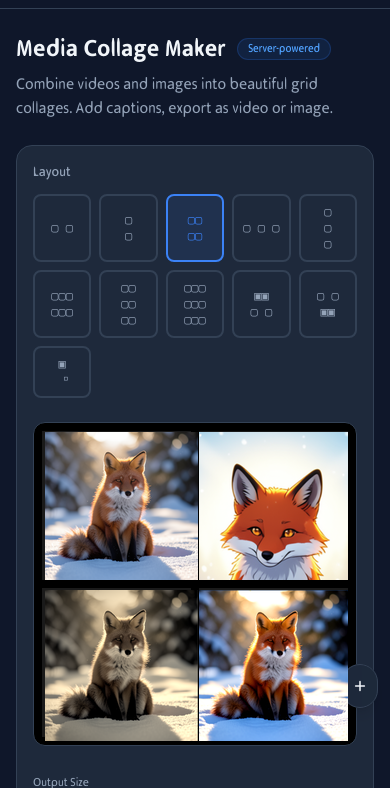
Media collage on mobile. Pick a layout and build from your camera roll.
How It Works
Choose Layout
Pick from 10 grid presets: 2x2, 3x3, side-by-side, feature layouts, and more.
Add Media
Drop videos or images into each cell. Mix and match freely — photos beside clips.
Export
Choose video (MP4) or image (PNG) output and download your collage.
Frequently Asked Questions
What formats are supported?
Videos: MP4, MOV, WebM. Images: JPG, PNG, WebP, GIF. You can mix videos and images in the same collage.
Can I output as image or video?
Yes! Choose 'Image (PNG)' for a static collage, or 'Video (MP4)' for animated output. Auto mode picks based on your content.
What's the maximum file size?
Each file can be up to 100MB. For best results, use compressed videos.
What output sizes are available?
Instagram Post/Story, Facebook Post, Twitter/X Post, YouTube Thumbnail, HD Landscape, and Portrait (4:5).
How long can the video be?
You can set duration from 3 to 30 seconds, or use 'Auto' to match the longest clip.
Can I add captions?
Yes! Each cell has a caption field. Captions appear at the bottom of each cell with a text shadow for readability.
Can I rearrange cells?
Yes. Drag and drop media between cells to rearrange. Swap positions, replace media, or clear a cell anytime.
Is there a watermark?
No. The output is clean — just your media arranged in the grid you chose.